
Duckout 2
Make room.
Right where it counts.
Spectral ducking and rhythmic pump behind one knob. Your vocal cuts through, your kick lands, and nothing else moves.
Instant download · macOS & Windows
Own Duckout 1? Log in for the upgrade price.Log in →

Turn a track down only where, and only when, something more important is playing. One knob. One screen. And a duck that ducks with it.
One knob. Two ways to duck.
Spectral ducking
Duckout 2 makes space in your mix by carving out only what clashes. It listens to your key (the sidechain) frequency by frequency, and cuts those same frequencies from the main track in real time, only while the key plays. Everything else stays put. Cleaner mixes, with the turn of a knob.
- Cuts only what clashes
- Back in milliseconds when the key stops
- DELTA lets you hear exactly what's removed
Rhythmic ducking
A curve dips the volume on every beat, locked to your session, or on every hit of a sidechain key. The classic pump, and twenty more shapes.
- 21 curves, from 1/1 to 1/16 with triplets and dotted
- Sync to the session, or pump from a sidechain
- Drag a curve to stretch its recovery
Click the knob's screen to switch. The screen turns yellow in Pump.
Everything on one screen.
A live display, one knob, and the tools you reach for most across the top. Everything else waits under Advanced.
See exactly what's cut.
White is this track and the key. Yellow is the cut, hanging from the top, frequency by frequency. Hover anywhere for the note and the depth there, and drag LO and HI to limit the band.
DELTA and SC LISTEN.
Hear only what's being removed, or hear the key itself. They light amber while they're on. Mix and Out sit right beside them.
One knob.
Amount in Punch, Depth in Pump. Click its screen to switch modes. The duck inside ducks harder the harder you push it.
Meters in the ring.
Gain reduction across the top, input lower left, output lower right. Hover the knob for exact readings.
Pump, in time.
The curve and its playhead on the left, the last few seconds of input, output and gain on the right. Drag the curve sideways to stretch its recovery.


21 curves in Pump mode. Stretch any of them.
From the classic Bloom to gates, stutters and offbeat swells. Drag a curve sideways in the plug-in to make it recover sooner or later.
Pro control, one click away.
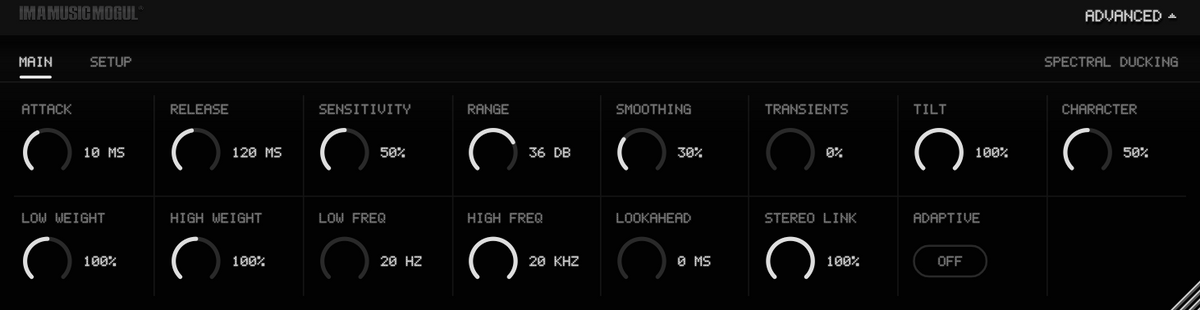
One knob gets you there. When you want more, open ADVANCED under the screen for every setting behind it: how fast the cut comes and goes, how deep it can go, where it listens, and how it treats your stereo field.
Clashing out. Space in.
Duckout 2 listens to your key track frequency by frequency and cuts only those frequencies from the track it's on, only while the key is playing. In Pump, a curve ducks the whole track in time with your session. Either way, the part that matters gets its space instantly.
Easy to use.
Insert it on a track, pick your key in the sidechain and turn up Amount. In Pump you don't even need a key.
Want to fine-tune? Drag LO and HI to limit the band, or open Advanced for everything behind the knob.
A faster workflow.
Duckout 2 saves you time. No drawing EQ moves or riding automation: the ducking follows the key by itself, frequency by frequency.
When a part needs room to breathe, Duckout 2 makes it in seconds.
Pro results.
Get the clarity of high-end productions in no time. Only what clashes moves, and only while it clashes, so the rest of the track stays put.
Cleaner, more transparent and easier to set than sidechain compression.
Try it right here.
Turn the knob, click its screen to switch modes, and press play. In Pump the curve runs live in your browser: pick a shape, change the rate, drag the curve to stretch it.
Hear the difference.
Switch between dry and Duckout 2 while it plays.
Vocal over guitars
Vocal Pocket · Amount 50%
dilla bounce
kick keyed to mix · Amount 20%
kick over 808
kick spacer · Amount 50%
GATED SYNTH
Gate · 1/8 · Amount 100%
Crested synth
crest · 1/4 · Amount 100%
Classic Pump
Bloom · 1/8 · Amount 100%
Every detail, considered.
Hear what's removed.
DELTA plays only what Duckout 2 takes out. The quickest way to set Punch.
Hear the key.
SC LISTEN plays the sidechain, so you know it's arriving.
Lands before the hit.
Up to 20 ms of lookahead, so the cut arrives before the attack. Your DAW compensates.
Mid, side or both.
Duck left and right, or the mid and sides together, the mid only or the sides only.
Apple Silicon.
Native on M-series and Intel Macs.
Unlock once.
Paste the key from your order email. It works on all your computers, offline, with no iLok and no account. Sessions saved in the demo recall as you left them.
pro tuned presets
Factory presets for the jobs you duck the most
Vocal Pocket
A gentle cut (18 dB at most) from 150 Hz to 8 kHz. Raise Amount until the words sit on top.
Kick Over Bass
Lows only, up to 250 Hz, quick to cut and back in 90 ms.
Snare Space
Fast resolution and 5 ms of lookahead, so the cut lands with the crack.
Reverb Duck
The tail steps back while the singer sings and blooms in the gaps.
Voice Over Music
Smooth and slow to recover, so the music doesn't pump between words. For podcasts and video.
The Classic
Bloom on every beat at full depth: the four-on-the-floor pump.
Kick Pocket
Dips on each kick and is back within a sixteenth. For tight kicks.
808 Pocket
Holds down for a long 808. Stretch the curve until the bass comes back as the 808 fades.
Offbeat Bounce
The track swells into the offbeat for a bouncing groove.
Trance Gate
Chops on every 1/16. Try 1/8 for a slower gate, or more Smooth for softer edges.
Tech specs.
- Formats
- AU AND VST3 ON MACOS. VST3 ON WINDOWS.
- macOS
- 10.13 or later. Apple Silicon and Intel, native.
- Windows
- WINDOWS 10 OR 11, 64-BIT.
- Hosts
- Logic Pro, GarageBand, Ableton Live, Studio One, Reaper and any other AU host.
- Channels
- Mono and stereo tracks, with a mono or stereo sidechain.
- Latency
- Set by Resolution and Lookahead, and compensated by your DAW.
- Licence
- One key for all your computers. Works offline, no iLok.
- In the box
- MACOS INSTALLER, WINDOWS INSTALLER, AU & VST3 FOR MANUAL INSTALLS AND A PDF MANUAL.
Questions.
How do I get Duckout 2 after buying?
You'll receive an email with your download and your licence key right after checkout, along with the user manual.
What's the difference between Punch and Pump?
Punch is spectral: it cuts only the frequencies your key is playing, only while it plays, so a vocal or kick gets its space and the rest of the track stays put. Pump is rhythmic: the whole track (or the band you choose) dips and swells on a curve, in time with your session or on every hit of a key.
Do I need a sidechain?
For Punch, yes: route the track that should cut through (the key) to Duckout 2's sidechain. Pump in Sync mode needs no key at all, it follows your session's tempo. Pump's Sidechain trigger pumps on each hit of a key instead.
Which DAWs does it work in?
Duckout 2 is an Audio Unit for macOS, so it runs in Logic Pro, GarageBand, Ableton Live, Studio One, Reaper and any other AU host on a Mac.
How do I unlock it? Do I need an iLok?
No iLok and no account. Your licence key is in your order email: click DEMO - UNLOCK in the plug-in's top bar, paste it, and click UNLOCK. It stays unlocked on every computer you use, and it's checked on your computer, so no internet is needed. Before you unlock it, Duckout 2 runs as a demo with every feature, but the sound dips out for a second every 45 seconds and sessions reopen on the default settings.
I own Duckout 1. Is there an owner price?
Yes. Log in with the account you bought Duckout 1 with, and your owner price shows on this page and applies at checkout.
The screen says KEY = INPUT. What's wrong?
Your DAW is feeding the track to its own sidechain. Pick the key track in the plug-in's sidechain menu (in Logic Pro, the Side Chain menu at the top of the plug-in window).